Construction progress guide
Activity templates
Progress tracking is built on activity templates: checklists of construction activities grouped under RERA's standard progress categories (see below). Templates come in three scopes.
- Phase templates cover phase-level infrastructure and common areas, like roads, compound wall, landscaping, and similar shared works that don't belong to one building.
- Building templates cover building-level structural work, such as excavation, superstructure, staircases and lifts, and external works.
- Unit templates cover work done inside individual flats or units: internal plaster and flooring, sanitary fittings, fixtures.
Templates are set up once by an administrator (under Settings → Progress Templates) and then applied wherever tracking needs to start. You don't need to build a checklist from scratch for every phase or building. Pick a template and Construvex creates the progress records for you.
Note: Editing the activities inside a template is an admin task. This guide covers using templates to start tracking progress, not building or editing them.
Initializing progress tracking
Before you can record any progress, a phase, building, or unit needs to be initialized from a template:
- Open the phase's Phase progress page (or a building's Building progress page).
- If nothing has been tracked yet, you'll see an initializer prompting you to pick a template: a Phase Infrastructure Template for phase-level common works, or a Building Template and a Unit Template for a specific building (both are required together).
- Select the template(s) you want and confirm. Construvex creates one progress record per activity in the template, ready to be updated.
Buildings that haven't been initialized yet, or that are missing a unit template, are flagged with an attention banner on the phase progress page so nothing gets missed.

Tip: Initialize buildings as soon as they're added to a phase, even before construction starts. It's easier to track from day one than to backfill activity history later.
Recording progress
Once activities exist, update them from the phase or building progress page:
- Status. Activities move through six states as work happens on site: Not Started, In Progress, Completed, Blocked, On Hold, and N/A for activities that don't apply.
- Evidence. Some activities require photo evidence before they can be marked complete; you'll be prompted to upload photos, with optional tags, at that point.
- Notes. Add context to any status update.
- Bulk updates. Select multiple activities at once, for example all activities on a floor, and update or mark them complete together.
Building progress pages offer a few ways to view and update activities depending on what you're looking at: an overall summary, a detailed activity list, and a heatmap-style matrix. Buildings tracked floor by floor also get a floor-wise view with an elevation diagram, so you can see and update status floor by floor or unit by unit.
RERA progress categories
Every activity belongs to one of RERA's standard construction categories, so your progress always maps back to the categories authorities expect in compliance filings:
| Category | Covers |
|---|---|
| Excavation | Site preparation, excavation, and foundation groundwork |
| Plinth | Plinth construction and ground-level work |
| Stilt Floor | Stilt/parking floor structure and finishing |
| Super Structure Slabs | Columns, beams, and floor slabs |
| Internal Works | Internal walls, plaster, flooring, doors and windows within a unit |
| Sanitary Fittings | Sanitary fittings within a unit |
| Staircases, Lifts & Lobbies | Staircases, lift wells, lobbies, and water tanks |
| External Works | External plumbing, external plaster, elevation, terraces |
| Installation & Finishing | Lifts, pumps, fire-fighting, electrical, and final finishing |
Each category shows its own percentage alongside the overall figure, so you can see, for instance, that a building is fully done with excavation and plinth but still mid-way through internal works.
How progress rolls up the hierarchy
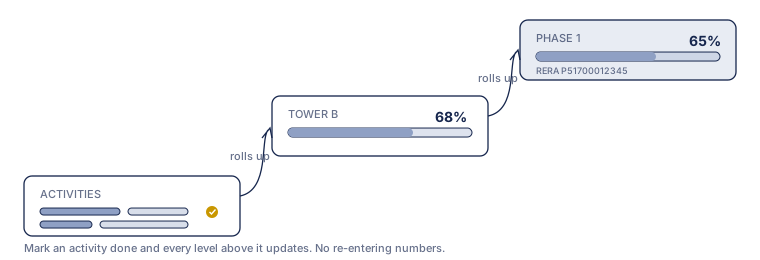
Progress recorded at the unit and building level aggregates automatically:
- Building progress combines its building-scope activities with its units' progress for categories that apply to both (internal works, for example), using a configurable weight per category that's split evenly between the two by default.
- Phase progress combines the average of all buildings in the phase with phase-level infrastructure progress, weighted so building work carries most of the weight and shared infrastructure the rest.
- The phase progress page shows the overall percentage, a per-building breakdown, and applicable RERA categories for each building, so you can drill from a phase-wide number down to the exact activity holding a building back.
Percentages recalculate as activities are updated, so the numbers you see on any level are always current as of the last update.
Exporting progress
Phase and building progress pages can be exported directly from the page for sharing or offline review. See Exports & audit trail. For how progress connects to your RERA categories and scope weights, see the RERA compliance guide.
Sales & CRM guide
This guide walks through the day-to-day sales workflow in Construvex: finding or adding a customer, opening a deal on an available unit, moving that deal through its stages, and seeing how a booked unit hands off to its payment plan.
Payments & collections guide
Set up payment plans, generate a collection schedule when a unit is booked, and track what's been received against what's due.